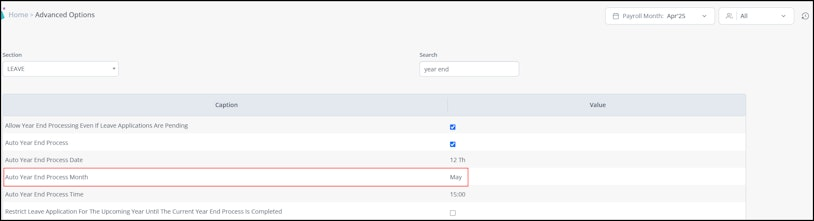
To customize the Leave Year-End month, from the greytHR Admin portal, go to Settings > System Settings > Miscellaneous > Advanced Options.
- Under Section select Leave.
- Under Search search for Auto Year End Process Month. The option displays in the table below
- Under Value add the month name and save the changes.
Looking for More Support?
Find answers and insights across our resources. Refer to our detailed Knowledge Base for in-depth articles, explore our practical Video Guides, and stay informed with our Latest Product Updates.
Want to explore more features on greytHR? Talk to Us!
Was this article helpful?
That’s Great!
Thank you for your feedback
Sorry! We couldn't be helpful
Thank you for your feedback
Feedback sent
We appreciate your effort and will try to fix the article